When opening my SVN repository today I recieved this error and one of my projects was unavilable.
Unexpected error encountered. It is recommended that you restart the application as soon as possible.
Error: The parameter is incorrect.
File: vsee\lib\xfcstr\winstrw.cpp
Line number: 166
The solution
Source
Open Visual Studio Tools > Options > Source Control
Then select None (Mine was on VSS)
Thursday, 11 December 2008

Wednesday, 26 November 2008
The difference between Web Site and Web Application Projects in VS
I think web application projects are the way to go as they support master pages, cassini (web server), and code behind model. For a detailed explaination of the differences read:
Comparing Web Site Projects and Web Application Projects
Another useful link to read is:
ASP.NET: Web Site versus Web Application Project
Comparing Web Site Projects and Web Application Projects
Another useful link to read is:
ASP.NET: Web Site versus Web Application Project
Monday, 24 November 2008
Point old dll versions to newer versions in web.config
The following web.config entry was giving me an error stating it could not find the dll:
To fix this I placed the following config entry which routes any old dll to the new dll:
<add assembly="System.Web.Extensions.Design, Version=1.0.61025.0, Culture=neutral, PublicKeyToken=31BF3856AD364E35" />
The reason for it missing is because System.Web.Extensions.Design is now in the GAC with .NET 3.5 and it can not find version 1.0.61025.0.To fix this I placed the following config entry which routes any old dll to the new dll:
<runtime>
<dependentAssembly>
<assemblyIdentity name="System.Web.Extensions.Design" publicKeyToken="31bf3856ad364e35"/>
<bindingRedirect oldVersion="1.0.0.0-1.1.0.0" newVersion="3.5.0.0"/>
dependentAssembly>
assemblyBinding>
runtime>
Make sure it is below the ConfigSections.Tuesday, 18 November 2008
Using HTTPModules to globalize a website
I am going so you a simple example of using HTTPModules to globalize a website. There are many reasons to use HTTPModules in this case - read more here.
First lets automatically detect the browser's prefered language in the web.config:
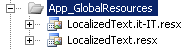
Next we will create the resx files that contain the language strings. Create the App_GlobalResources folder if it doesn't already exist within Visual Studio. Add the following resex files:
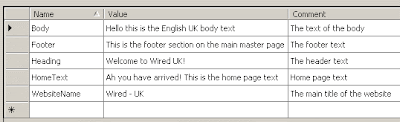
This is the contents of LocalizedText.resx:
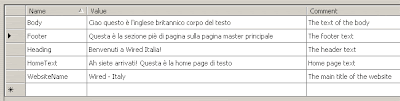
This is the contents of LocalizedText.it-IT.resx:
Now lets move on and work on the web form:
On this web form we have created a literal to display the browers current culture settings (CurrentCulture). We have a drop down list (CultureList) that is databound to the XML file we created eariler which displays a list of supported cultures. You can see we using explicit localization i.e. <%$ Resources:LocalizedText, Body %>.
Now lets wire up the events:
First lets automatically detect the browser's prefered language in the web.config:
<system.web>
<globalization uiCulture="auto" culture="auto" />
<system.web>
xml version="1.0" encoding="UTF-8"?>
<Cultures>
<Culture Name="en-GB" NativeName="English (United Kingdom)"/>
<Culture Name="it-IT" NativeName="Italian (Italy)"/>
Cultures>
Lets call the XML file SupportedCultures.xml.Next we will create the resx files that contain the language strings. Create the App_GlobalResources folder if it doesn't already exist within Visual Studio. Add the following resex files:

This is the contents of LocalizedText.resx:

This is the contents of LocalizedText.it-IT.resx:

Now lets move on and work on the web form:
<body>
<form id="form1" runat="server">
<div>
<div>
Browser culture: <asp:Literal ID="CurrentCulture" runat="server" Text="Current culture:{0} Current UI culture:{1}">asp:Literal>
div>
<div>
Force culture:
<asp:DropDownList ID="CultureList" runat="server"
DataSourceID="SupportedCulturesDataSource" DataTextField="NativeName"
DataValueField="Name" AutoPostBack="True"
ondatabound="CultureList_DataBound"
onselectedindexchanged="CultureList_SelectedIndexChanged">
asp:DropDownList>
div>
<h1>
<asp:Literal ID="Header" runat="server" Text="<%$ Resources:LocalizedText, Heading %>">asp:Literal>h1>
<asp:Literal ID="MainBody" runat="server" Text="<%$ Resources:LocalizedText, Body %>">asp:Literal>
<div>
<asp:Literal ID="HomePageText" runat="server" Text="<%$ Resources:LocalizedText, HomeText %>">asp:Literal>
div>
<asp:Literal ID="Footer" runat="server" Text="<%$ Resources:LocalizedText, Footer %>">asp:Literal>
div>
<asp:XmlDataSource ID="SupportedCulturesDataSource" runat="server"
DataFile="~/Resources/SupportedCultures.xml">asp:XmlDataSource>
form>
body>
html>
On this web form we have created a literal to display the browers current culture settings (CurrentCulture). We have a drop down list (CultureList) that is databound to the XML file we created eariler which displays a list of supported cultures. You can see we using explicit localization i.e. <%$ Resources:LocalizedText, Body %>.
Now lets wire up the events:
protected void Page_Load(object sender, EventArgs e)
{
CurrentCulture.Text = string.Format(CurrentCulture.Text, Thread.CurrentThread.CurrentCulture.Name,
Thread.CurrentThread.CurrentUICulture.Name);
}
protected void CultureList_SelectedIndexChanged(object sender, EventArgs e)
{
Response.Redirect(Request.Url.AbsolutePath + "?culture=" + CultureList.SelectedValue);
}
protected void CultureList_DataBound(object sender, EventArgs e)
{
CultureList.SelectedValue = Thread.CurrentThread.CurrentCulture.Name;
}
The HTTPModule code to handle every request is below:using System;
using System.Data;
using System.Configuration;
using System.Globalization;
using System.Linq;
using System.Threading;
using System.Web;
using System.Web.Security;
using System.Web.UI;
using System.Web.UI.HtmlControls;
using System.Web.UI.WebControls;
using System.Web.UI.WebControls.WebParts;
using System.Xml.Linq;
namespace Sandbox.CondeNet.Platform20.HTTPModules
{
public class GlobalizationModule : IHttpModule
{
#region Implement IHttpModule
public void Init(System.Web.HttpApplication context)
{
context.BeginRequest += new EventHandler(Context_BeginRequest);
}
public void Dispose()
{
}
#endregion
private void Context_BeginRequest(object sender, EventArgs e)
{
HttpRequest request = ((HttpApplication)sender).Request;
HttpContext context = ((HttpApplication)sender).Context;
string culture = request.QueryString.Get("culture");
if (string.IsNullOrEmpty(culture) == false)
{
Thread.CurrentThread.CurrentCulture = CultureInfo.CreateSpecificCulture(culture);
Thread.CurrentThread.CurrentUICulture = Thread.CurrentThread.CurrentCulture;
}
context.RewritePath(request.Url.AbsolutePath);
}
}
}
<httpModules>
<add name="GlobalizationModule" type="Sandbox.CondeNet.Platform20.HTTPModules.GlobalizationModule, Sandbox.CondeNet.Platform20.HTTPModules" />
httpModules>
Subscribe to:
Posts (Atom)